This page is to access the Deep Seeker entry for LD48, if you want to access the future versions go to postld48 (not currently available).
Currently due to a known bug/problem of the Godot engine esported for web I would recomend to use this page as manual,
but play with the native version for your system if available.
Otherwise mute the audio to avoid headaches :).
Audio glitches now are way less updating to Godot 3.3 give its comuity some love!
Each cell has a given number of blobs (yes it's the technical term); when clicked a cell will be previewed in the microscope and the slots relative to each blob will be shown with a number inside.
The cell contains a start marker as black arrow label on the membrane pointing to the starting blob; the bots will connect to this marker to process the cells.
Each blob has a numerical value associated with it (no blob is zero),
they are sorted by wavelength of the blob partand the list is:






The nanobot will attach to the cell in the marker and start its program. To avoid spoiling the beginning of the gameplay the reference and journey to the language is included at the end of the page
The cell contains a start marker as black arrow label on the membrane pointing to the starting blob; the bots will connect to this marker to process the cells.
Near each cell's blob the bot can store a value (represented in the corresponding slot) and the value of the slot under the blob where the nanobot is (marked in red) will be called current value.
The nanobots must be small and last long time to be effective, that's why there are resource limitation that can be queried overing their icons on the bottom right of the lab.
To insert the instruction there are keyboard bindings described below, to move the writing cursor use the arrows and backspace and delete are used as you were writing text.
The instructions act on the bot position and current slot according to the current table:

(">" binding) Moves the bot to the next slot according to start makrer direction

("<" binding) Moves the bot to the previous slot according to start makrer direction
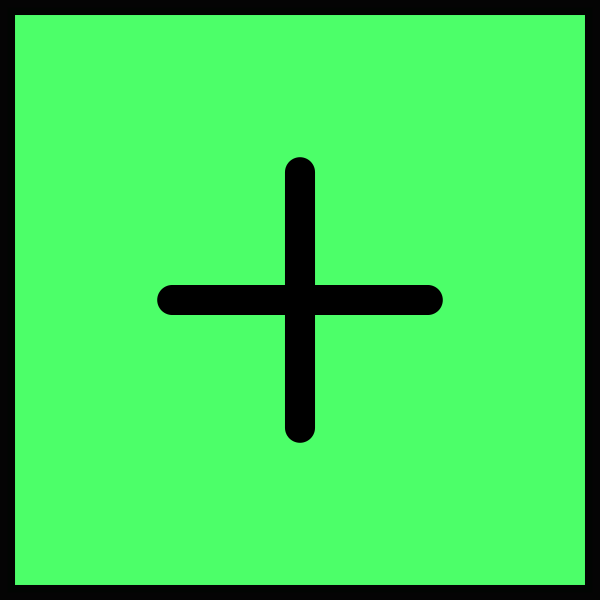
("+" binding) Increments the current value

("-" binding) Decrements the current value

("," -comma- binding) Adds the blob type number to the current value

("." -period- binding) Destroys the cell if and only if the current value is not zero

("[" binding) If the current value is zero all the program between this and the corresponding "]" will be skipped

("]" binding) If the current value is non-zero execution loops back to the corresponding "["
As a simple reminder for the square brackets instructions you can think:
[ ***code to run*** ]
is the same as
                while(currentValue != 0) { // "["
                    ***code to run***
                } // "]"
There is the program resource (brain) that indicates how many instruction your program is made of, than there is time that is the number of instructions executed (cell dependent, counting loops).
The programming language is inspired by the exoteric programming language BrainFuck. Some changes (but not all the ones I thought about for semplicity sake) were taken to make it more interesting and less mind-dumbing verbose the solutions to the levels.
The initial idea had also multiple starting points per cell (and different directions) and multiple deadly cells to kill with the same bot. I hope to implement those with the step-by-step debugger (missing only UI implementation for now) and custom cell/level editor in the future, after I recover from the LD48 jet-lag.